

Optimizing Bundle Size & Performance in a Next.js eCommerce Application

A Real-World Case Study from Production
Project Context:
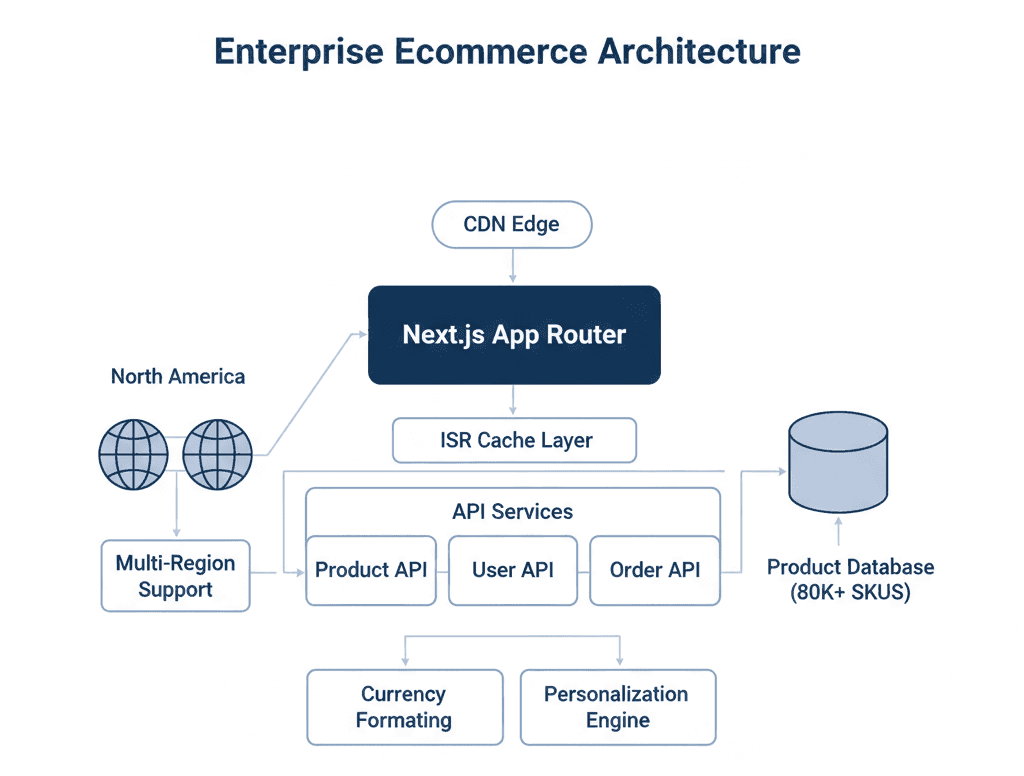
This case study is based on a multi-region B2C eCommerce platform built with Next.js 13 (App Router) and React 18, deployed on a CDN-backed edge network. The application served:
- ~1.2M monthly active users
- 80K+ SKUs across 6 primary categories
- North America, and Europe with currency and pricing differences
- 70% mobile traffic (mid-tier Android devices dominant)
The architecture used:
- App Router with hybrid Server and Client Components
- Edge middleware for region detection
- ISR for category and product pages
- Client-side filtering on PLP (Product Listing Page)
- Several third-party scripts (analytics, personalization, A/B testing)
Performance doesn't matter for only technical things also for these reasons:
1. Organic traffic contributed ~55% of revenue.
2. Mobile conversion rate was highly sensitive to load time.
3.Core Web Vitals had begun to regress after feature expansion.
Over time, incremental feature additions increased JavaScript payload significantly. Performance degradation was gradual but measurable.
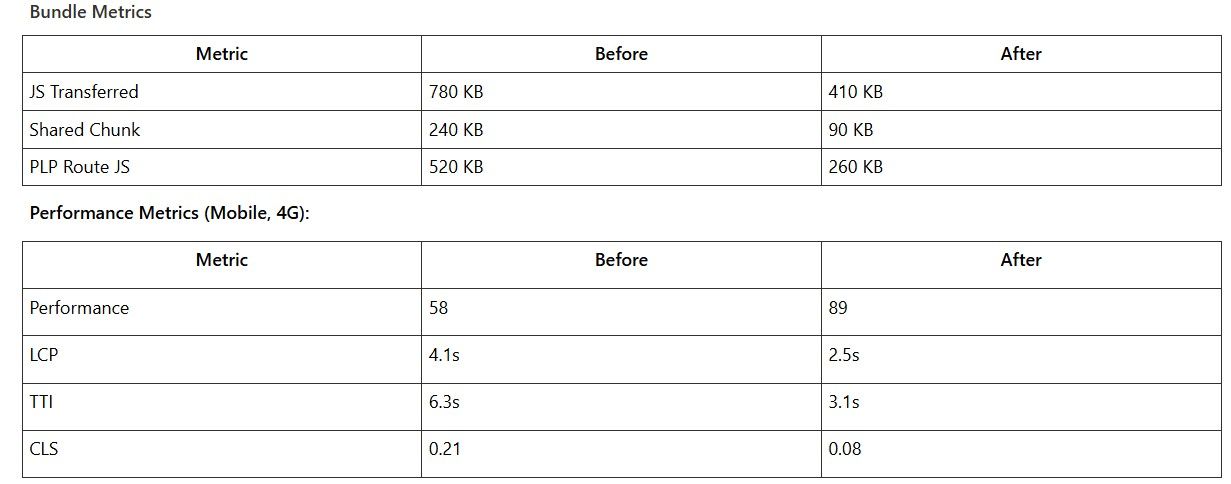
Observed Metrics (Mobile, 4G Throttled)
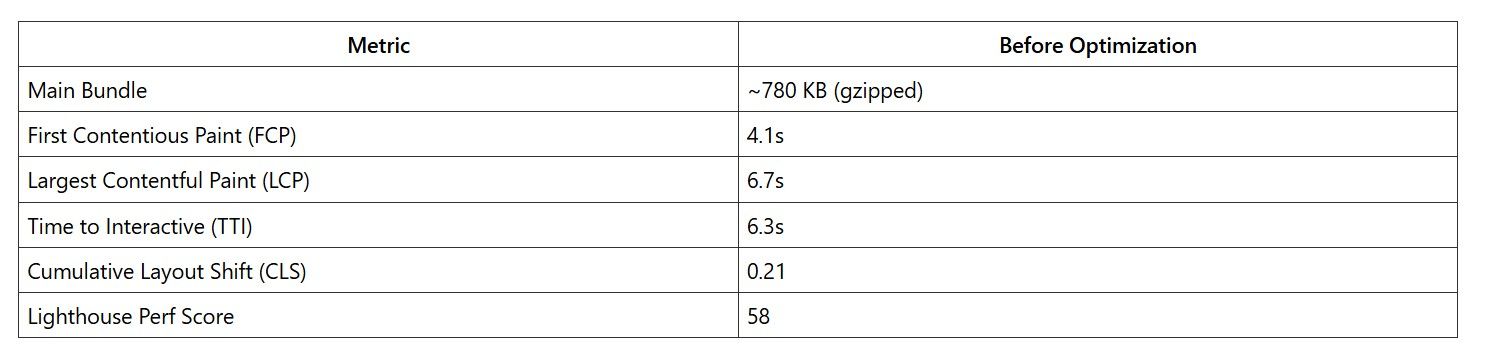
Key issues:
- Large shared chunks loaded across all routes.
- Product Listing Page shipped filter logic and sorting logic even for users who didn’t interact.
- The checkout bundle included unused payment SDK logic in the main chunk.
- Multiple third-party scripts blocking the main thread.
- Client components overused in App Router.
Mobile users on mid-tier devices experienced noticeable input delay after page load.
The most problematic route was /category/[slug], which combined:
- Dynamic filters
- Sorting
- Personalization
- Currency formatting
- Recommendation widgets
Investigation & Root Cause Analysis
Tools Used
- Webpack Bundle Analyzer
- next build -- profile
- Chrome DevTools Performance tab
- Lighthouse CI
Coverage tab in Chrome
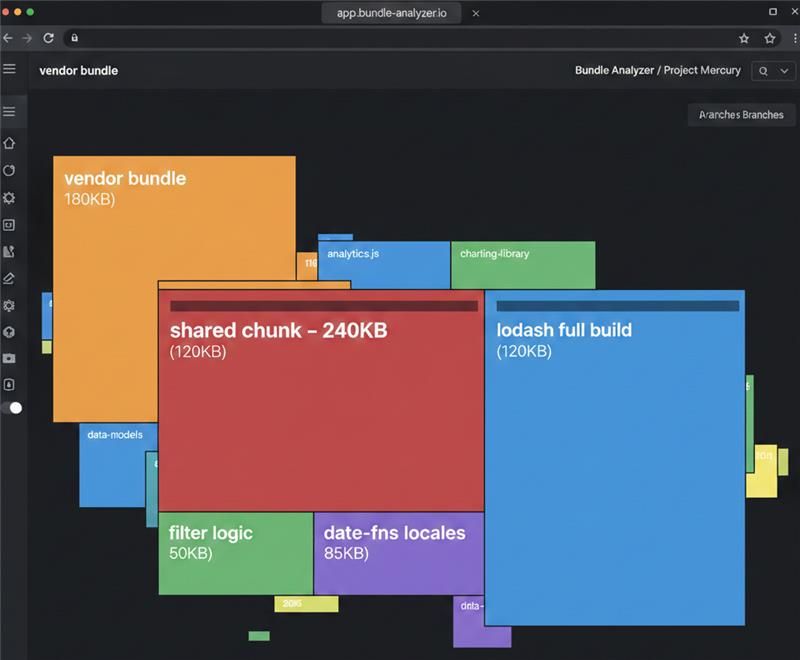
Key Finding 1: Shared Chunk Bloat
The analyzer revealed:
- A 240 KB shared chunk used across all routes.
Inclusion of:
Full lodash build
date-fns with multiple locales
Currency formatting utilities duplicated across components
Large filter state management logic
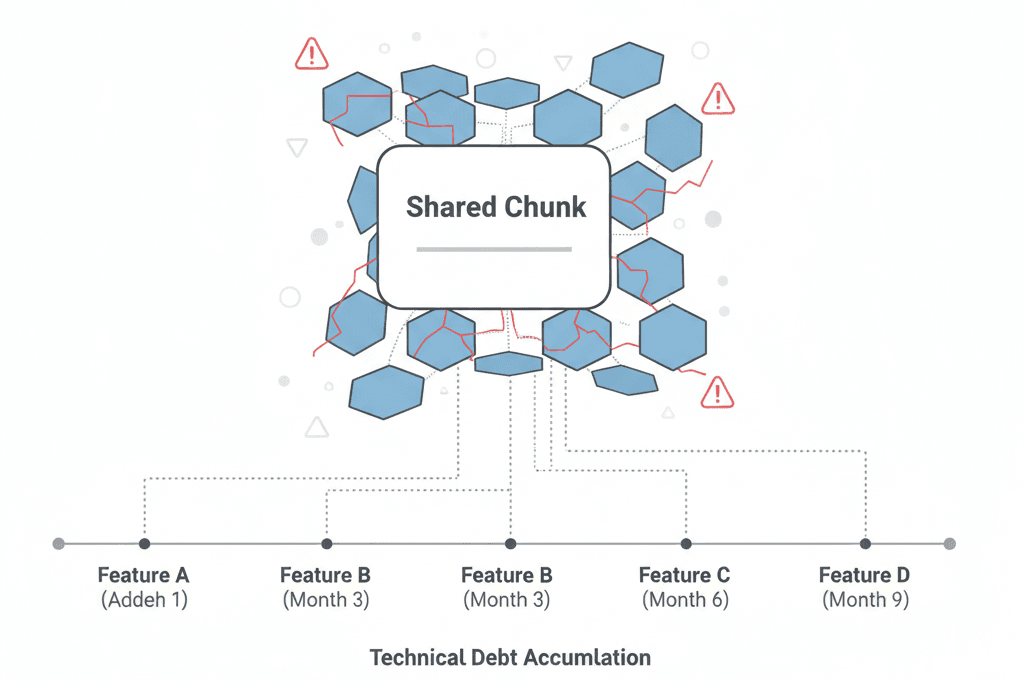
The issue wasn’t just size — it was where it was loaded.
This shared chunk was required by nearly every route because common layout components were marked as use client.
Key Finding 2: Overuse of Client Components
With App Router, any component marked use client pulls its dependency tree into the client bundle.
We discovered:
- The main layout had use client
- Header included search, cart badge, and region selector
- All Children inherited client-side execution
This alone accounted for ~180 KB of unnecessary hydration JS.
Key Finding 3: Third-Party Script Blocking
We were loading:
- Analytics
- Heatmaps
- Personalization engine
- Payment SDK
- Chat widget
Some were loaded via inline <script> tags instead of next/script.
They blocked the main thread for ~600–800ms on mobile.
Key Finding 4: PLP Filtering Logic
The product filtering implementation:
- Stored full product list in client state
- Applied filtering in-browser
- Used complex derived state calculations
This added both bundle weight and runtime CPU cost.
Optimization Implementation
Aggressive Code Splitting
Dynamic imports were introduced for:
- Filter sidebar
Example:
const FilterSidebar = dynamic(() => import('./FilterSidebar'), {
ssr: false,
});
These components are loaded only upon interaction or visibility.
We avoided blanket ssr: false usage and applied it selectively.
Shared Chunk Optimization
A large shared chunk (340 KB) was being generated automatically by Next.js.
Aggressive Code Splitting
Dynamic imports were introduced for:
To fix this, we customized the splitChunks configuration inside next.config.js.
Changes applied:
- Modified cacheGroups
- Increased minChunks from 2 → 3
- Restricted vendor chunk creation to more widely used dependencies
Example:
webpack: (config, { isServer }) => {
if (!isServer) {
config.optimization.splitChunks.cacheGroups = {
...config.optimization.splitChunks.cacheGroups,
commons: {
test: /[\\/]node_modules[\\/]/,
name: 'vendors',
chunks: 'all',
minChunks: 3,
priority: 10,
},
};
}
return config;
};
Result:
Prevented rarely used dependencies from entering the shared vendor bundle
Kept route-specific utilities isolated
- Reduced unnecessary bundle bloat
- Kept route-specific utilities isolated
- Improved initial page load
Fixing Tree-Shaking Failures
Some internal utility packages were structured like:
export * from './currency';export * from './date';export * from './filters';
This prevented effective tree-shaking.
We refactored to direct imports and avoided barrel exports in performance-critical modules.
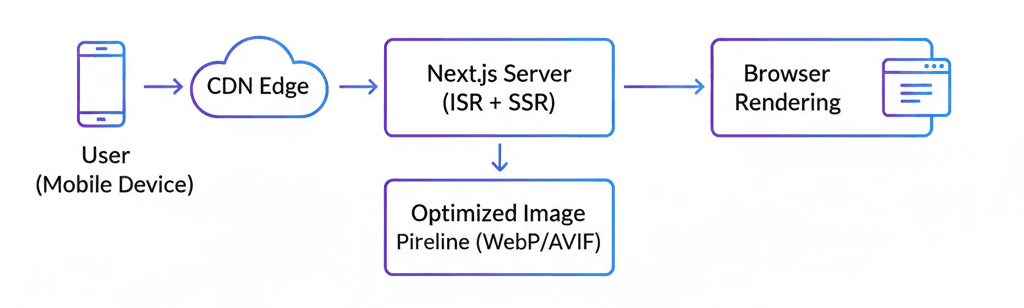
Image Optimization ArchitectureChanges implemented:
- Migrated all images to next/image.Enabled AVIF and WebP.
- Used responsive sizes properly.
- Lazy-loaded below-the-fold content.
- Reduced hero image dimensions for mobile.
Rendering Strategy Per Route
We adopted a nuanced approach rather than blanket SSR or SSG:
- Homepage: ISR with 60-second revalidation (deals change frequently)
- Product pages: ISR with on-demand revalidation via webhook when inventory/price changes
- Category pages: SSG for top 200 categories, SSR for long-tail
- User dashboard: CSR (requires authentication anyway)
- Checkout: CSR with prefetched chunks
This eliminated unnecessary server rendering overhead while maintaining SEO benefits where needed.
Removing Heavy Libraries
Findings:
- lodash used for only 4 utilities.
- date-fns imported full locale data.
- A currency library added 70 KB for formatting.
Fixes:
- Replaced lodash with native
- Imported date-fns functions individually.
- Used Intl.NumberFormat instead of external currency
Net reduction: ~120 KB.
Trade-off:
-
Increased number of cache keys.
- Slightly higher backend load.
But we removed ~90 KB of client-side filtering logic and eliminated runtime CPU cost.
Third-Party Script Management
Replaced inline scripts with next/script:
<script src="https://analytics.js" strategy="afterInteractive" />
Non-critical scripts moved to:
strategy="lazyOnload"
Chat widget deferred until user interaction.
Main thread blocking is reduced by ~700ms.
SSR vs SSG vs ISR Decisions
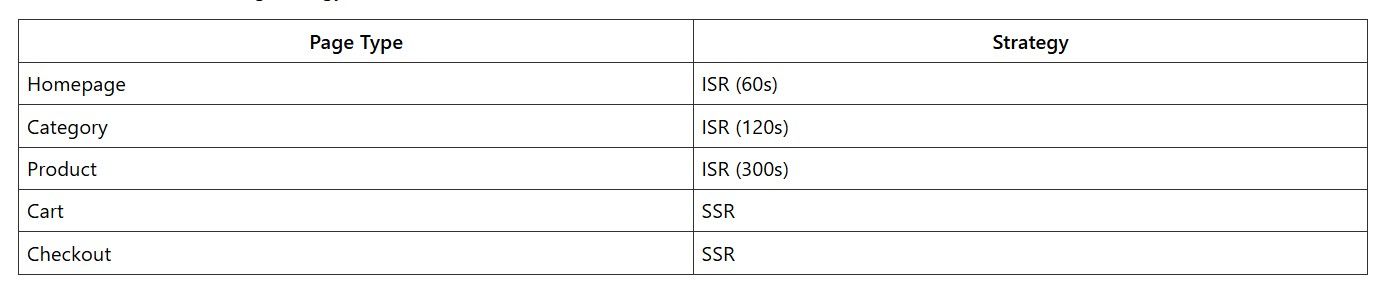
Checkout remains SSR due to personalization and inventory validation.
This reduced client hydration work and avoided unnecessary re-renders.
Architecture Decisions & Trade-offs
Decision: More Server Components
Improved performance but increased:
- Developer complexity
- Mental overhead around boundaries
However, it forced discipline around what truly required client execution.
Decision: Dynamic Imports for UX Enhancements
Some interactions now load components on demand.
Trade-off:
- Slight delay on first interaction.
- But significantly lighter initial load.
We prioritized first load performance over secondary feature speed.
Decision: Not Optimizing Micro-Level CSS
We intentionally did not:
- Rewrite Tailwind usage.
- Extract critical CSS manually.
- Micro-optimize atomic class generation.
Because:
- Gains would be marginal.
- Engineering time better spent on JS reduction.
Results & Measurable Outcomes
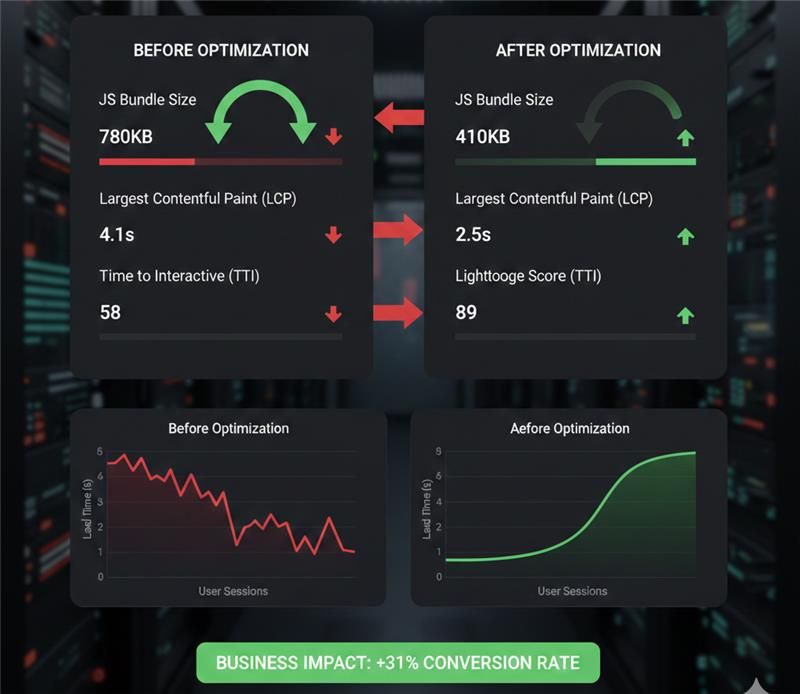
After four weeks of optimization work across two engineers:
Key Learnings & Best Practices
1. Default Configurations Are Not Sacred
Next.js makes strong default choices—but they are optimized for general use cases, not high-scale eCommerce platforms.
- Analyze your real usage patterns.
- Validate assumptions with profiling.
- Don’t hesitate to override defaults when data supports it.
2. Measure Before You Optimize
Several suspected bottlenecks turned out to be non-issues.
- Spend time instrumenting and profiling first.
- Use real performance data, not intuition.
- Tie every optimization to measurable UX metrics.
A 100 KB reduction is meaningless if it doesn’t improve user experience.
3. App Router & Component Discipline Is Critical
Architecture decisions compound quickly.
- Default to Server Components.
- Opt into "use client" only where strictly necessary.
- Avoid marking layouts as client components — impact cascades.
Rendering strategy matters more than micro-optimizations.
4. Shared Chunk Growth Is the Silent Killer
Shared bundles expand quietly over time.
- Monitor shared chunks continuously.
- Feature teams often grow them unintentionally.
- Add Bundle Analyzer checks into CI.
- Avoid “convenience imports” without checking
Without governance, entropy returns quickly.
5. Third-Party Scripts Require Governance
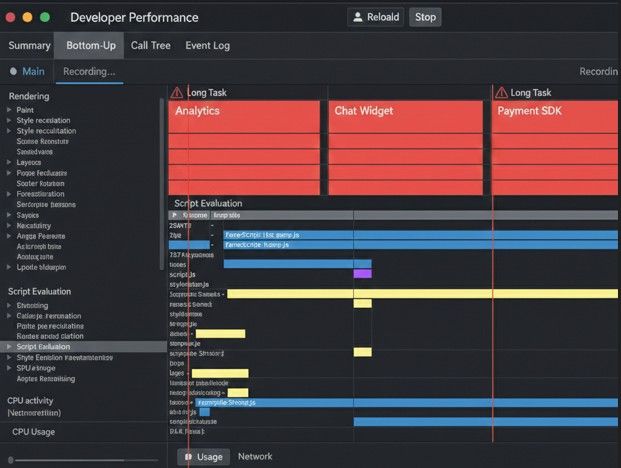
Third-party scripts are often the biggest performance drain.
Every script must:
- Justify its performance cost.
- Define a loading strategy.
- Be monitored continuously.
Question every tag manager addition.
6. Dynamic Imports Are Not Free
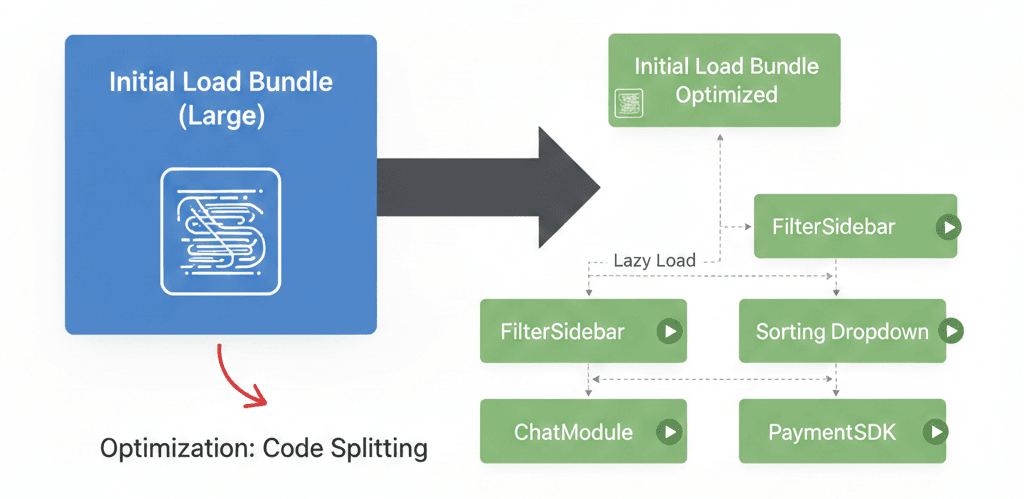
Dynamic imports improve perceived performance — but:
- Each creates a separate chunk.
- Each triggers a network request.
- Overuse causes fragmentation.
Group related functionality to avoid “death by a thousand cuts.”
7. Server-Side Responsibility Scales Better
For large catalogs, client-side filtering increases:
- Memory usage
- CPU cost
- Bundle size
Server-side filtering + ISR provides better balance and scalability.
Push responsibility to the server whenever possible.
8. Image Optimization Is Infrastructure, Not Component-Level
In eCommerce, images dominate page weight.
- Solve image optimization at the infrastructure layer
- Avoid per-component hacks
- Treat it as table stakes
9. Performance Is Architectural, Not Cosmetic
The biggest gains came from:
- Rendering strategy decisions
- Component boundary discipline
- Reducing client-side responsibilities
- Bundle governance in CI/CD
Not from clever tricks.
Final Takeaway
Performance at scale isn’t about hacks.
It’s about:
- Systematic measurement
- Disciplined architecture decisions
- Organizational alignment
- Willingness to push back on features that harm UX
The technical work is straightforward once the culture supports it.

Transform Your Vision into Digital Reality
Innovative Web & App Solutions Designed to Drive Growth, Efficiency, and Success for Your Business.
Categories
Tech insights and expert perspectives on thefuture of technology and eCommerce
Tech insights and expert perspectives on the future of technology and eCommerce

Let's Connect