
Shopify Plus ERP Integration in 2026


How to Connect NetSuite, SAP & More Without Breaking Your Store
If you run a Shopify Plus store doing anything north of a few thousand orders a month, the question isn't whether to connect it to your ERP — it's how to do it without turning your storefront into collateral damage every time finance updates a price list or operations adjusts inventory thresholds.
In 2026 the stakes have moved up. Shopify Plus is no longer just a higher-volume Shopify; it is increasingly the system of engagement for enterprises that previously sat on Magento, SAP Hybris, or Salesforce Commerce Cloud. Meanwhile, ERPs like NetSuite, SAP S/4HANA, Microsoft Dynamics 365, Sage Intacct, and Odoo have become the unmistakable source of truth for inventory, pricing, tax, and customer master data. The integration layer between them is where most enterprise commerce programs quietly fail.
This is a long, deliberately technical guide — but every architectural decision in it has a business consequence underneath. If you are a CIO, CTO, head of digital, or a founder running a fast-scaling DTC brand, this is the playbook you can hand to your team.
Why Shopify Plus ERP Integration Is Harder in 2026 Than It Was in 2022
Three things have changed that make integration both more powerful and more dangerous.
First, the surface area exploded. A typical Shopify Plus store no longer integrates with just an ERP. It also talks to an OMS, a WMS or 3PL, a CRM, a CDP, a tax engine, a PIM, a loyalty platform, an AI search and recommendation layer, BNPL providers, multiple payment gateways, and now agentic checkout flows like Shopify's ChatGPT integration. Each new node is a potential failure point.
Second, the API contract changed. Shopify deprecated the unversioned REST Admin API for new public apps in 2024, and as of the 2026-01 API release, the platform is firmly GraphQL-first. The GraphQL Admin API uses a cost-based rate limit (roughly 1,000 points per minute on standard plans, 2,000 on Shopify Plus, with point cost varying by query complexity). Bulk operations were also lifted: in 2026-01 and later, apps can run up to five concurrent bulk mutation operations and five concurrent bulk queries per shop, with JSONL files capped at 100 MB and a 24-hour mutation deadline. If your integration was designed around 2023-era REST patterns, it is almost certainly leaving throughput on the table — or worse, throttling itself silently.
Third, business expectations got tighter. Customers expect real-time inventory accuracy, sub-second ATC responses, and tax that is correct at order line level on the first try. Finance expects orders to flow into the GL the same day. Operations expects fulfillment status to round-trip from the 3PL to the storefront within minutes. None of that is achievable with the nightly batch jobs many mid-market merchants still rely on.
The Five Architectural Patterns You Will Choose Between
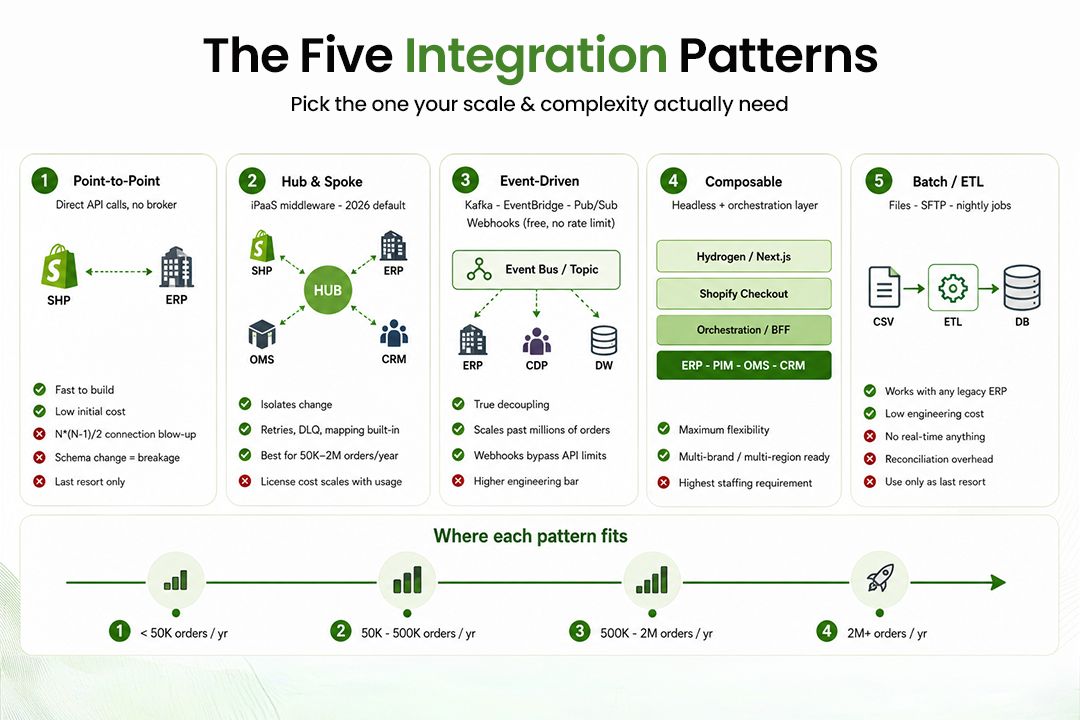
There are really only five real-world patterns for connecting Shopify Plus to an ERP. Everything else is a flavor of one of these.
1. Point-to-Point (Direct API)
Your Shopify Plus store and your ERP talk directly through their respective APIs, usually via custom code running on a server you own.
This is fast to build and cheap to start. It is also the pattern most likely to collapse under its own weight. Every new system you add multiplies the connections (N×(N-1)/2 problem). One ERP schema change can break four downstream flows at once. Avoid this unless you have exactly two systems and no plan to grow.
2. Hub-and-Spoke via Middleware (iPaaS)
Shopify Plus and the ERP both connect to a central integration platform — Celigo, Boomi, Workato, MuleSoft Anypoint, Tray, or n8n at the open-source end. The middleware owns mapping, transformation, retries, dead-letter queues, and observability.
This is the dominant 2026 pattern for mid-market and enterprise merchants for one reason: it isolates change. When SAP introduces a new field on the material master, you change one mapping in the middleware, not seven services. Most enterprise Shopify Plus deployments we deliver at Techies Infotech use this pattern.
3. Event-Driven Architecture (EDA)
Shopify webhooks publish events (orders/create, inventory_levels/update, customers/update) into a message broker — typically Kafka, Azure Event Hubs, AWS EventBridge, or Google Pub/Sub. Downstream services (ERP sync, OMS, CDP, analytics) consume independently.
Importantly, Shopify webhooks do not consume API rate-limit points — they are push-based and free. EDA is the only pattern that scales gracefully past a few million orders per year, and the only one that gives you true decoupling.
4. Composable / Headless with a Commerce Backbone
The storefront is decoupled (often a Hydrogen, Next.js, or Remix front end), Shopify Plus owns checkout and order capture, and the ERP becomes one node among several behind an orchestration layer. This is the architecture used in our Kanaa composable commerce case study
This pattern is the most flexible — and the most expensive to staff. Choose it only if your business model demands it (multi-brand, multi-region, BOPIS-heavy, B2B+B2C blended).
5. ETL / Batch (Last Resort)
Files dropped on SFTP, parsed nightly, loaded into Shopify via bulk operations. There is exactly one good reason to still build this in 2026: an old ERP that has no usable real-time API and that your finance team refuses to migrate.
The Four Pillars Every Integration Must Get Right
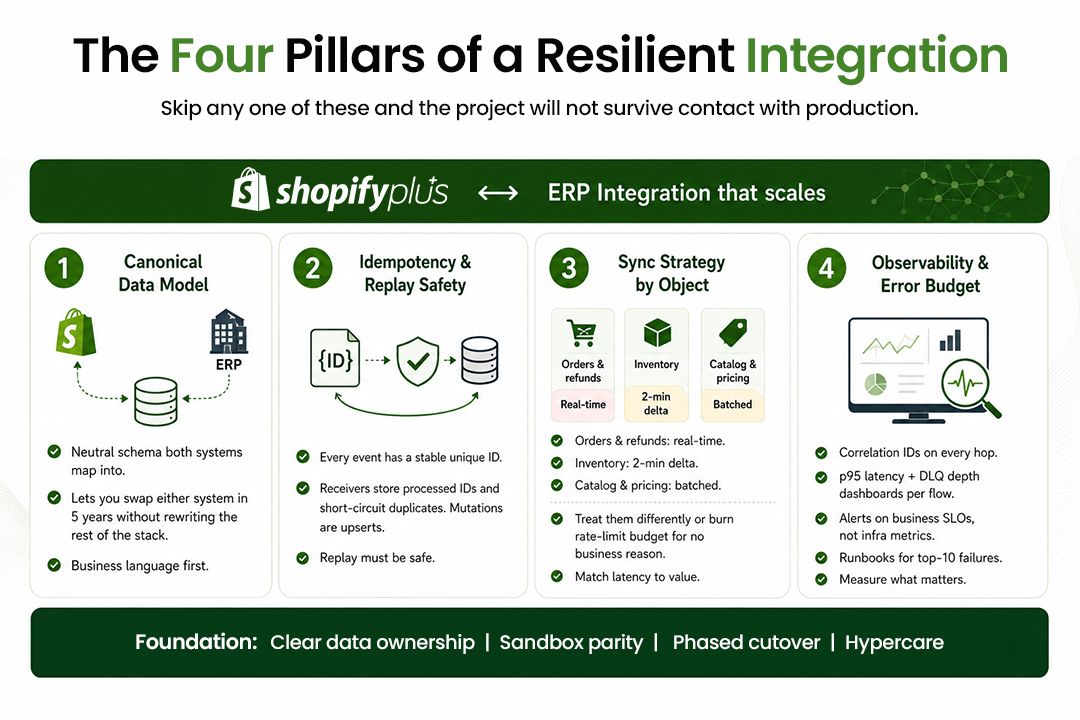
Regardless of pattern, every Shopify Plus ERP integration stands or falls on four things.
Pillar 1: The Canonical Data Model
Do not let either system dictate the shape of your data. Define a canonical model — a neutral schema for Product, Variant, InventoryRecord, Order, Customer, Address, PriceList, TaxLine — and have both Shopify Plus and the ERP map into it.
Why this matters to a business owner: when (not if) you replace one of these systems in five years, the canonical model is what keeps the rest of your stack from collapsing.
A minimal canonical record for inventory might look like this:
{ "sku": "SM-DENIM-32-IN",
"location_id": "WH-DXB-01",
"available": 47,
"committed": 3,
"incoming": 120,
"incoming_eta": "2026-05-28",
"source": "NetSuite",
"source_record_id": "INVDETAIL_45221",
"updated_at": "2026-05-20T11:42:08Z",
"event_id": "evt_01HXX9P3K..."
}
The event_id is non-negotiable. It enables idempotency, which is the next pillar.
Pillar 2: Idempotency and Replay Safety
Networks fail. Webhooks deliver twice. Your sync job restarts mid-batch. If your integration cannot safely receive the same event twice without double-posting orders or doubling inventory adjustments, it will eventually corrupt your books.
Three rules, no exceptions:
- Every event carries a stable unique ID generated at the source. Shopify provides
X-Shopify-Webhook-Id; use it. - The receiving side stores processed IDs (Redis with TTL, DynamoDB, or a
processed_eventstable) and short-circuits duplicates. - Mutations are written to be replay-safe — upsert by external ID rather than blind insert, conditional updates with version numbers.
Pillar 3: Sync Strategy by Object Type
Not every object needs real-time sync. Treat them differently or you will burn through your rate limit budget for no business reason.
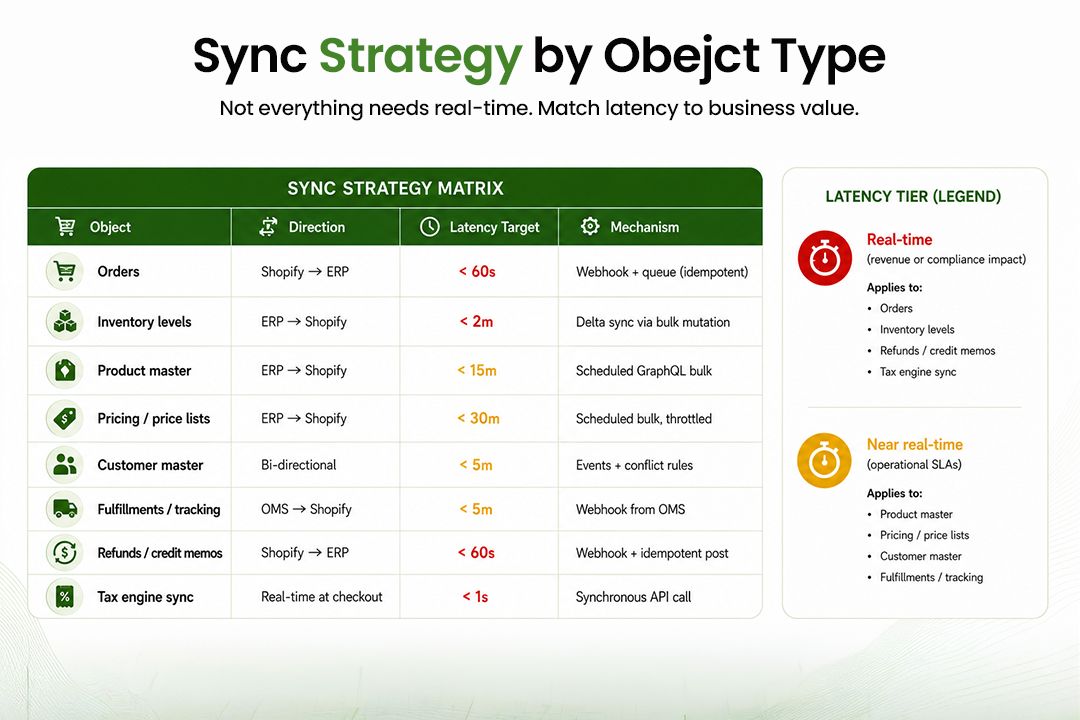
A pattern we see fail repeatedly: merchants push every inventory tick to Shopify as a single GraphQL call. At 50,000 SKUs across 12 warehouses, that is 600,000 mutations a day. Use inventorySetQuantities in a bulk mutation against delta files instead — five concurrent bulk operations now make this trivial.
Pillar 4: Observability and a Real Error Budget
If you cannot answer "what is the lag between an ERP price change and that price being live on the PDP?" with a number, you do not have an integration — you have a wish. This is where cloud and DevOps capability matters. Every flow needs:
- A structured log line at every hop (correlation ID, source system, target system, payload hash, status, duration).
- A dashboard showing throughput, p95 latency, error rate, and dead-letter queue depth per flow.
- Alerts on business SLOs ("orders not in NetSuite within 10 minutes") rather than only on infrastructure SLOs ("Lambda errored").
- A documented runbook for the top 10 failure modes.
Without these, the team that built the integration becomes the only people who can debug it — and they will leave.
Connecting Shopify Plus to NetSuite
NetSuite remains the most common ERP target for Shopify Plus merchants in the $5M–$500M revenue band. Connection options, in order of maturity:
- SuiteTalk REST and SuiteTalk SOAP. REST is the modern choice. Authenticate with OAuth 2.0 Token-Based Authentication (TBA). Rate limits apply per account — typically 1,000–5,000 concurrent requests depending on license — so respect them.
- SuiteQL. A SQL-like query language exposed over REST that lets you extract complex joined data sets from NetSuite without writing SuiteScript. Indispensable for delta detection:
WHERE lastModifiedDate > ?is your friend. - SuiteScript 2.1. When you need NetSuite to push events outward (e.g., a User Event script that fires on Item Fulfillment creation), SuiteScript with
https.post.promise()calls into your middleware. This closes the real-time loop the REST API alone cannot. - Pre-built connectors. Celigo's NetSuite-Shopify connector is the market leader for a reason — it handles the 80% case (orders down, inventory up, fulfillments down, refunds up) out of the box. Use it when your flows are standard. Replace it with custom code only where it cannot bend to your business rules.
A small but expensive gotcha: NetSuite's inventory model is location-aware and lot/serial-aware. Shopify's Location and InventoryLevel are simpler. Build the abstraction in your middleware, not in either system. Our enterprise integration services handle this abstraction layer as a default deliverable on every project.
Connecting Shopify Plus to SAP
SAP integration depends entirely on which SAP you mean. In 2026 the realistic targets are:
- SAP S/4HANA Cloud (Public or Private Edition). Connect via SAP's OData V4 APIs exposed through the Business Technology Platform (BTP) or directly through the S/4HANA API endpoints. Authentication is typically OAuth 2.0 via the Identity Authentication Service. For higher volumes, use the SAP Integration Suite (formerly CPI) as your iPaaS layer — it has pre-built content for commerce scenarios.
- SAP ECC (legacy). If you are still on ECC, you have three realistic options: SAP PI/PO, SAP Integration Suite Cloud Connector, or a third-party adapter that wraps IDocs and BAPI calls in HTTP. The IDoc-to-event pattern (an IDoc generated by SAP gets translated to a JSON event published to your message bus) is the cleanest way to bring an ECC environment into a modern event-driven architecture.
- SAP Commerce Cloud (Hybris) sitting in front of S/4HANA. Increasingly we see merchants run Shopify Plus alongside Hybris for new geographies or DTC channels, with both flowing into S/4. The data ownership rules here matter more than the protocol — decide which system owns customer master and which owns the order before you write a line of code.
The classic SAP mistake: treating SAP as the synchronous source of truth at checkout. Don't. Cache enough data in Shopify (or in a dedicated read store) to render the PDP, add to cart, and complete checkout without ever calling SAP synchronously. Reconcile asynchronously.
Microsoft Dynamics 365, Sage, Odoo, and the Rest
- Dynamics 365 Finance & Operations / Business Central. Use Dataverse and the Power Platform / Logic Apps for orchestration. Business Central exposes a clean REST API that maps well to Shopify objects.
- Sage Intacct, Sage X3. REST APIs exist but are less rich. Most merchants use iPaaS connectors (Celigo, Boomi) here.
- Odoo (Community or Enterprise). XML-RPC and JSON-RPC APIs cover everything Odoo can do. For mid-market merchants, Odoo + Shopify Plus is one of the most cost-effective stacks on the market.
- Acumatica, Infor, Microsoft Dynamics GP, NAV, AX. All connectable. The pattern is identical: pick your middleware, define the canonical model, sync delta-only, observe everything.
Custom Build vs Connector vs iPaaS: A Decision Framework
This is where most business owners get stuck. Here is the honest decision matrix.
A nuance worth stating plainly: the "build it yourself" path looks cheapest in year one and most expensive in year three when the engineer who built it has moved on. Account for that in your business case.
The hybrid that actually works for most Shopify Plus merchants in 2026: use an iPaaS for 70% of standard flows, write a thin custom service for the 30% that contains your competitive logic (loyalty rules, B2B pricing tiers, custom tax handling).
The Nine Failure Modes That Kill Most Integrations
After enough projects, the failure patterns repeat. Watch for these.
- Treating webhooks as guaranteed delivery. Shopify retries failed webhooks for up to 48 hours, but you still need a reconciliation job that compares Shopify's orders against the ERP nightly.
- No backfill strategy. Day one you go live with 90 days of history; day 180 finance asks for last year. If your sync code cannot replay an arbitrary date range, you will rebuild it under pressure.
- Hardcoded mappings. Tax codes, currency codes, location IDs, payment method IDs — all of these belong in a config service, not in code.
- Ignoring multi-currency math. Shopify Markets, NetSuite multi-book, SAP currency conversion — these three do not agree by default. Pick one source of truth for FX and document it.
- No throttling on the ERP side. Your ERP has rate limits too, often stricter than Shopify's. Build a token bucket in your middleware before NetSuite locks your account for the day.
- Synchronous calls in checkout. Any external call in the checkout path with a p99 above 200 ms will hurt conversion. Cache, queue, or eliminate.
- No staging parity. Your sandbox NetSuite has 12 items. Production has 80,000. Performance bugs only appear at scale.
- Storefront breakage from product feeds. Bulk product imports that fail mid-run leave the catalog in an inconsistent state. Use transactional batches and roll-forward semantics.
- No business-readable monitoring. A red dashboard in Datadog means nothing to your CFO. Translate "queue depth > 1,000" into "orders are now 15 minutes behind."
For a real-world walkthrough of how a compliance-first architecture handles many of these in production — particularly around ZATCA e-invoicing and address validation — see our Steve Madden Shopify Plus middleware case study. For mission-critical reliability after rescue, the Muscat Duty Free rescue walks through stabilizing a commerce platform under real revenue pressure, and the Adventure HQ launch shows warehouse-system integration done from day one.
A Phased Cutover That Will Not Break Your Store
Big-bang cutovers are how integrations destroy revenue. The pattern that works:
- Phase 0 — Discovery (2–4 weeks). Document every flow, every field, every business rule. Map source-of-truth ownership for each object. Define your canonical model. Sign it off with finance, ops, and engineering together.
- Phase 1 — Read-only sync (3–4 weeks). Push ERP data into Shopify with no writes back. Catalog, inventory snapshots, customer master. Validate the data with the business teams. Nothing user-facing changes yet.
- Phase 2 — One-way write (3–4 weeks). Start sending orders from Shopify to ERP. Finance team reconciles daily for two weeks. Catch every edge case before turning on automation.
- Phase 3 — Full bi-directional (4–6 weeks). Fulfillments, refunds, customer updates, loyalty events. Always behind feature flags. Always with rollback.
- Phase 4 — Hypercare (4 weeks). A dedicated team watches dashboards, fixes runbooks, and trains the support org. This is the difference between a project that lands and a project that ships.
Total realistic timeline for an enterprise Shopify Plus to NetSuite or SAP integration: 4 to 7 months. Anyone selling you 8 weeks is selling you a connector, not an integration.
What "Done" Actually Looks Like
A Shopify Plus ERP integration is done — not built, not deployed, but done — when:
- Orders flow from Shopify to the ERP in under 60 seconds, with retry and dead-letter handling, 99.9% of the time.
- Inventory accuracy on the storefront is within 0.5% of warehouse truth at any point in the day.
- Finance closes the books each month without a manual reconciliation spreadsheet.
- A non-developer can read the integration dashboard and know whether the business is healthy.
- A new market, channel, or warehouse can be added by configuration, not by code change.
If your current integration does not pass that bar, it is not finished. It is just live.
Frequently Asked Questions
Can I do this without middleware?
For a single store with fewer than 50,000 orders per year and standard flows, yes — a pre-built connector is fine. Above that, or with any non-standard business logic, middleware pays for itself within 18 months in reduced incident cost alone.
How long does Shopify Plus to NetSuite integration take?
For a typical mid-market merchant with one Shopify Plus store and one NetSuite instance, expect 12–16 weeks for a connector-based project and 5–7 months for a custom middleware build. Multi-entity NetSuite or multi-region Shopify Plus extends this by another 6–10 weeks.
Will the integration slow down my storefront?
Only if it is built wrong. A well-designed integration runs entirely off the critical path. The only sync calls during checkout should be to your tax engine and payment gateway. Everything else — ERP, OMS, CRM — happens after the order is captured.
What happens to my integration when Shopify deprecates an API version?
Shopify supports each API version for one year. You should be testing against the next quarterly release in a sandbox at all times. If your middleware abstracts the Shopify API behind your canonical model, version upgrades become a one-week task, not a one-quarter project.
Can AI agents and Shopify's ChatGPT integration coexist with my ERP integration?
Yes, and this is increasingly the point. Agentic checkout flows still terminate in a Shopify order — which then enters your existing pipeline. The integration design does not change. What does change is the importance of having clean product data and reliable inventory in Shopify, because the agent's recommendations are only as good as the data it can see. See our AI Solutions for commerce for how this lands in production.
What is the single biggest mistake to avoid?
Letting either Shopify or the ERP dictate your data model. Define the canonical model first, in business language, and make both systems serve it. Everything else flows from that decision.
Final Word
Shopify Plus ERP integration in 2026 is not primarily a technology problem. The APIs are mature, the patterns are well understood, and the tooling is excellent. It is a discipline problem — about doing the canonical model work upfront, choosing the right pattern for your scale, designing for failure, and measuring the right things.
Done well, it becomes the spine that lets your business add channels, geographies, and revenue lines without rewriting anything. Done poorly, it becomes the bottleneck every other initiative trips over.
Post Tags :

Transform Your Vision into Digital Reality
Innovative Web & App Solutions Designed to Drive Growth, Efficiency, and Success for Your Business.
Categories
Tech insights and expert perspectives on thefuture of technology and eCommerce
Tech insights and expert perspectives on the future of technology and eCommerce

Let's Connect